Category: Technology

  • Hawaiian Missile Scare – Why Design Matters

    Earlier this year, there was a lot of tension with North Korea and a huge accidental scare in Hawaii when an employee mistakenly sent out an emergency alert warning of a ballistic missile attack.  What made matters worse is that there was no way for the state to cancel the message and it took 38 minutes for them to retract it.

    I can’t image the state of panic, then relief and then anger when they learned it was all a mistake.  I have to believe more than a few people said some terrible things to some, confessed love for others or did  a whole lot of regrettable things.  But the worst part of it all, is that it was easily preventable with just the slightest bit of effort of UX/UI design.

    This is the the screen the employee had to use:

    How is that even possible for something so important?  My only comment is that I know (and love) Hawaii and I feel like I know how government contracts work and this is the result of the two.

    But I also know it’s easy to criticize and even ever to criticize without providing any solutions.  The internet is an amazing place and many people quickly mocked up some quick fixes, none more popular than this one by a UX Designer, Luca Milan.  He separated the different types of alerts and it’s so much more clear.

    When I thought about this, my first question was, why are the test and live alerts on the same system, let alone the same page?  And then, if they have to be on the same page, why aren’t they in different sections and why are they labeled so poorly?  But I’ve worked with plenty of engineers to know the reason why and I’ve without a doubt made some bad design decisions myself.

    So, I did something I don’t normally do and put together a page in a few minutes with all off the shelf stuff and I think it shows that just a few minutes of effort could really improve this site.

    I know it looks like it’s straight from Bootstrap and that’s kind of the point.  I used the starter template and copied examples in the documentation, added font awesome and quickly made a tabbed interface that groups and lists each type of alert clearly.

    I would never want to mix the test/live actions together, but if I had to, I think it should default to the one with less ramifications if it was sent in error.

    And the live links should have some visual indicators to show they are for actual emergencies.  Looking at the screenshot, I now think all of the links should be color coded as well, but there are a million other refinements that I would go add with time.
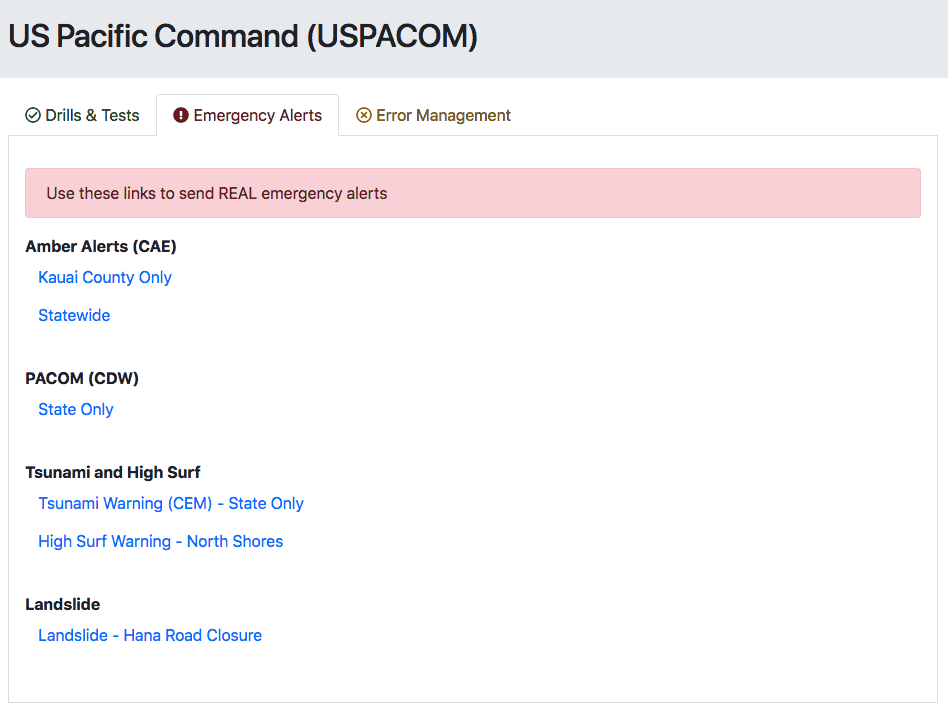
    Luca added an error management section to issue a false alarm.  I think it’s good to have a section for other links, but I’d also display a banner or some type of message to cancel the alert immediately after it’s sent.

    And there has to be some sort of confirmation to issue an emergency alert.  Realistically, it would be on the next page where they type in the alert message.  And as a side note, I’m not sure why the Bootstrap danger button color doesn’t match the danger alert and text.

    This is all out-of-the-box, basic Bootstrap stuff but I think some simple changes would make a big difference.

    And knowing Hawaii, I still have so many questions on this interface.  Like why the Amber alert is only for Kauai County or statewide?  What about the other counties?  And should this then be a different input to select multiple counties?  Maybe the North shore high surf warnings are supposed to be state wide, but I think of Oahu when I think of the North shore (and one of my favorite old, bad movies.).  But then, why is the landslide alert only for Hana, which is in Maui?  Would people on the big island need to get that alert?  Again, so many questions…

    If nothing else comes out of this, this is something that should be in every book about the importance of design.

    Here’s a link to my test page.

  • User Experience Journey – Part 1 & 2

    Over the past year, I’ve learned a lot more about User Experience (UX) Design.  It’s something I’m passionate about and I feel like it’s something I was meant to do.  10 years ago, my dream job would’ve been to work as a UI designer, but there were very few positions and UX wasn’t really a thing.  So I became a web developer and I’ve enjoyed a very nice career.

    But even with web development, most developers are more interested in coding and I’ve always been more interested in the creativity and design of the front-end.  I’ve been so interested in UX Design that I’ve thought about a possible career change. It’s a really tough thing to do but I’d like to at least explore the field and see where it takes me.

    Fortunately, I’m in a position where I can continue to do more normal web development work and also exercise what I’m learning in UX. And if I don’t end up pursuing a full-time UX position, the worst case is, I’ll be a better developer because I’ll have more knowledge about design.

    So far, I’ve read these books to get started:
    Don’t Make Me Think – Steve Krug
    Rocket Surgery Made Easy – Steve Krug
    Design of Everyday Things – Don Norman
    Web Form Design – Luke Wroblewski

    I’ve gone through half of an online courses on Udemy by David Travis:
    User Experience (UX): The Ultimate Guide to Usability and UX

    And I read a lot of blogs and LinkedIn posts every day to learn as much as I can.  So far, my biggest take aways are that:

    1. I’ll need to buy lots of Post-it Notes
    2. Ironincally, I’ve been peeling this wrong my whole life
  • Rebooting – Part 2

    Rebooting – Part 2

    It’s been nearly a year since I relaunched my personal website and I’m still back-filling blog posts. I haven’t spent as much time on it as I’d like to, but I’m pretty happy with how the WordPress API has worked out. When I started working on my site and the API was in beta, there wasn’t a whole lot of documentation or examples on how to use it. But I realize that APIs exist so you can do whatever you want and it’s really up to you to figure out how you want to use them.

    As always, I would’ve done some things differently if I were doing it now. The single function that handles the URL parameters and does an AJAX post to get the data works well, but I probably should use a JavaScript templating engine like instead of building HTML strings to display the posts. It’d be easy enough to convert it now, but I don’t know if it’s worth the time and also the resources of including another JS library like Mustache. I also would’ve started by using ESLint to format my JavaScript consistently. Again, this is something I could easily do now and fix whatever it doesn’t like with my code.

    But overall, I’m still pleased with how it’s working and the overall design. I just need to catch up on posts so I can write some in the present for once.  Hopefully I’ll get some time over the holidays.

  • Rebooting

    It’s almost 2017 and it’s time to start over again.  I made my last profile site in 2010 and I stuck with my blog for a little bit, but I made it too hard to update and stopped posting after awhile.  I thought it would be easy enough, but that was before I was married and had two kids!

    I’ve also always gone back and forth on if I should I have a professional site, a personal site or a mixture of both.  This time around, I’ve decided to keep my main site career focused and my blog will mostly be a place to log some of the things I’ve made with some personal things sprinkled in here and there.

    I try to work on personal projects to learn new things and improve my technical skills.  I originally had plans to write a whole blog platform from the ground up.  Since I’ve been working the Microsoft stack lately, I thought I would design a SQL Server database and use ASP.Net MVC to build an administration interface and front-end.

    However, I had some new ideas to work on other projects that will take what little free time I have to learn more new stuff, so I had to revise this plan.  My new site is pure HTML and Javascript and I decided to use WordPress for my blog.  But instead of just modifying a theme, I decided to use the WordPress REST API (Version 2, currently beta 15).  I will write some details when it’s all complete, but for the most part, my blog is a single html page that does AJAX calls to get JSON data and I use jQuery to iterate the data and display the content.

    I’m going to finish up my site, hopefully add some new content and backfill my blog with my old posts.  We’ll see how this version goes but I feel pretty optimistic this time.

  • Amazon vs Microsoft on Apple

    Earlier this year, I was updating my iPad and saw this:

    Amazon updates

    So, Amazon is making the world a better place?  I can’t argue with that.  Amazon Prime is amazing.  I don’t even use the movies, music streaming, free books or other included services, but the products and 2-day shipping are priceless.  Ok, maybe $1oo/year if Amazon is reading this.

    My wife “looks” on Amazon every night and says she doesn’t buy anything, but somehow packages show up at our house every day.

    On a side note, Microsoft’s Office products are surprisingly good on the iPad, but the updates are also pretty ridiculous.  Each product has a 400+ MB update of bug fixes and it seems to happen quite a bit.

  • Windows Updates

    We pretty much have all Apple stuff in our house, but my wife still has a Windows laptop.  She hadn’t used it in a few months and I turned it on only to see this:

    Windows Updates

    Windows has never been my favorite, but I thought Windows 7 was pretty good.  Although, I don’t understand why Microsoft couldn’t figure out a better way to do updates.  They used to pretty good with cumulative service packs, but that seemed to end after SP1.  I don’t remember what happened after this, but I’m sure the updater came up with more updates after it rebooted.  And of course, my wife updated it to Windows 10 unintentionally after this, which they’re now apologizing for.


  • Hello Again

    I used to use Macs when I was a kid and then I switched over to PCs in the mid-90’s when Apple hit a low point and Microsoft took over.  I even hated Macs shortly afterwards because I had to support them despite nobody using them at the time.

    But something happened and of course, it was Steve Jobs.  He got Apple back on track and the rest is history.  I didn’t even notice that Macbook Pros started using Intel processors.  When I finally caught on that I could use the Mac with all the great creative apps but still boot to Windows to do my regular work and play games, I was in and haven’t looked back.

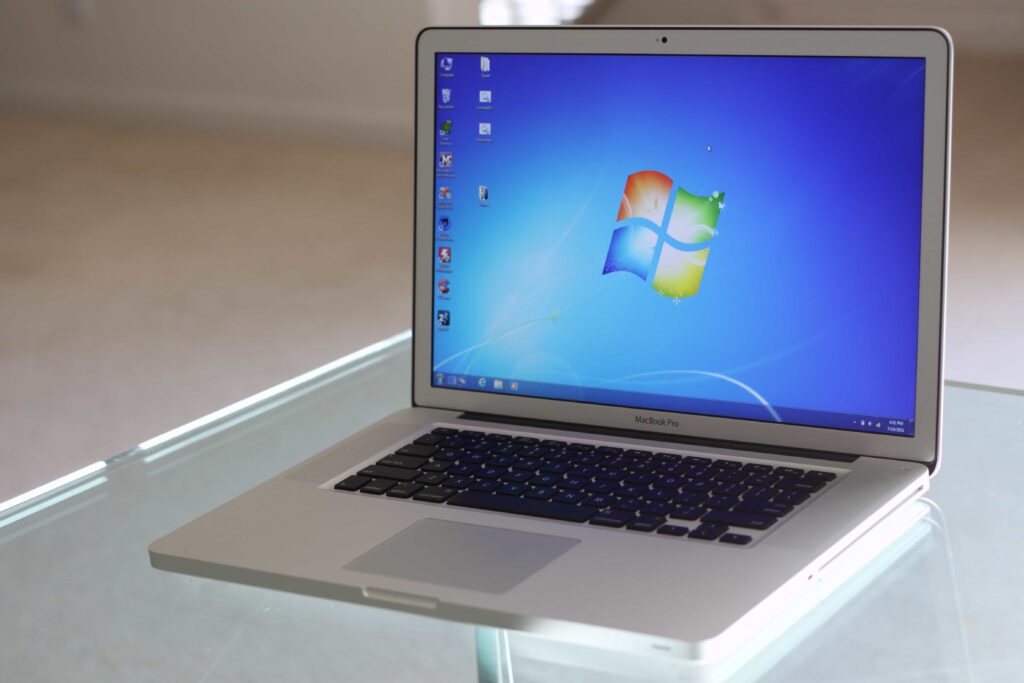
    This was my 2011 Macbook Pro with the anti-glare screen.  It was really an amazing computer and everything just felt so polished and designed incredibly well.  2011 MBP

    It was even known as the best Windows laptop, but this still makes my head spin.

    2011 MBP bootcamp

    It was easily the best computer I’ve ever owned.  Unfortunately, this model did have a problem with the graphics card that was soldered onto the logic board.  Mine didn’t have any problems until one day, nearly 5 years later, it did.  But I was able to give it to my in-law who rebuilt one using my parts so it didn’t go to waste.